Flatly
Flatly is a Figma plugin that turns all layers inside a frame or component into a single image fill. It lets designers choose the output scale and decide what happens to the original layers.
Problem
Flatly is a Figma plugin that turns all layers inside a frame or component into a single image fill. It lets designers choose the output scale and decide what happens to the original layers.
Approach
Flatly is a Figma plugin that turns all layers inside a frame or component into a single image fill. It lets designers choose the output scale and decide what happens to the original layers.
Plugin
Flatly is a Figma plugin that turns all layers inside a frame or component into a single image fill. It lets designers choose the output scale and decide what happens to the original layers.
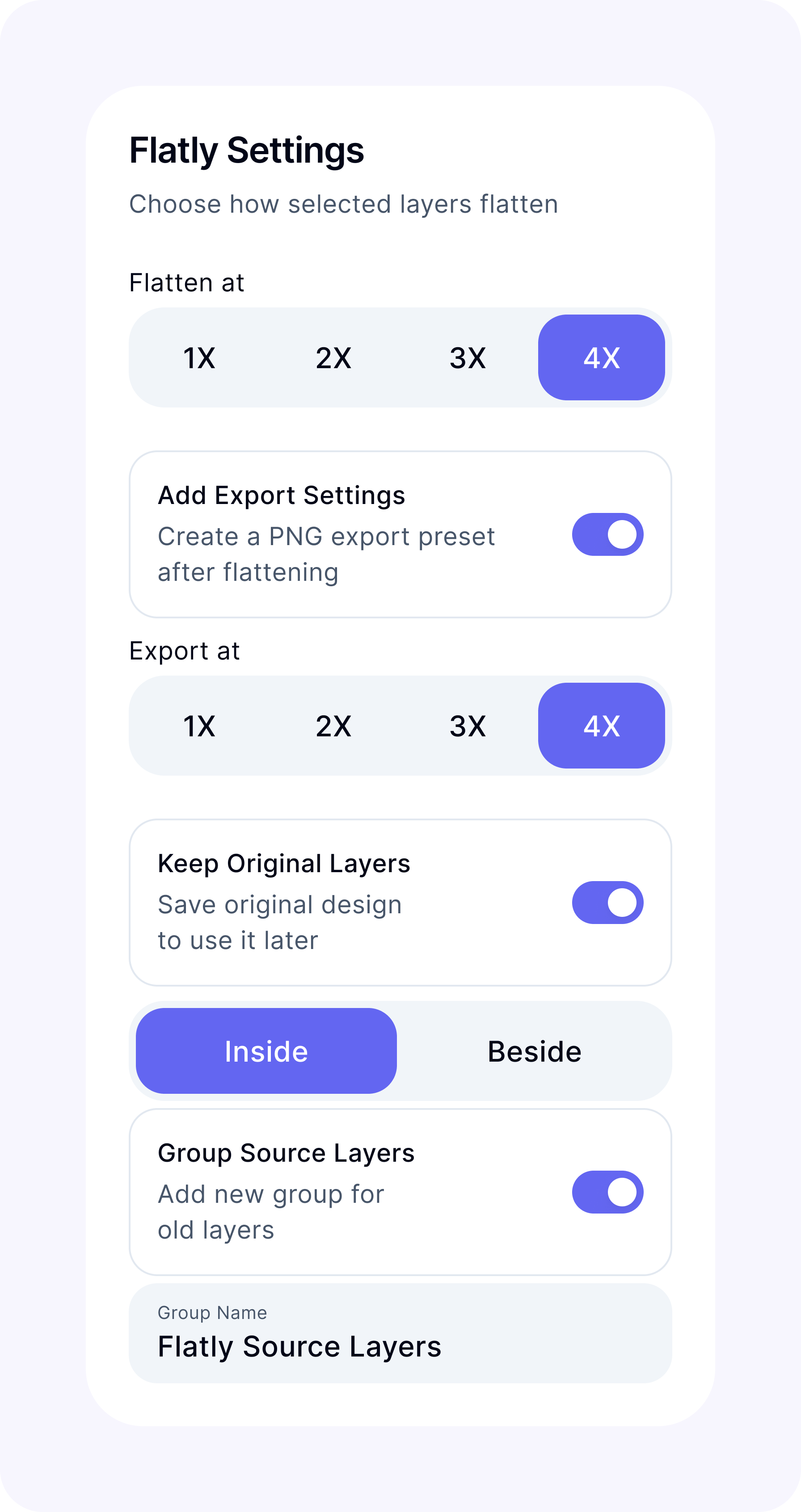
Flatly Settings
Result
Flatly is useful across teams that work with graphics, including graphic design, design systems, and product teams. It removes the same manual steps from every asset and lets designers flatten several graphics at once, which saves time whenever the task comes up repeatedly.
Flatly
Flatly is a Figma plugin that turns all layers inside a frame or component into a single image fill. It lets designers choose the output scale and decide what happens to the original layers.
Problem
Flatly is a Figma plugin that turns all layers inside a frame or component into a single image fill. It lets designers choose the output scale and decide what happens to the original layers.
Approach
Flatly is a Figma plugin that turns all layers inside a frame or component into a single image fill. It lets designers choose the output scale and decide what happens to the original layers.
Plugin
Flatly is a Figma plugin that turns all layers inside a frame or component into a single image fill. It lets designers choose the output scale and decide what happens to the original layers.
Flatly Settings
Result
Flatly is useful across teams that work with graphics, including graphic design, design systems, and product teams. It removes the same manual steps from every asset and lets designers flatten several graphics at once, which saves time whenever the task comes up repeatedly.
Flatly
Flatly is a Figma plugin that turns all layers inside a frame or component into a single image fill. It lets designers choose the output scale and decide what happens to the original layers.
Problem
Graphics often need to be flattened before they are used in layouts. This makes them easier for developers to export and keeps them displaying correctly without extra constraint setup. Doing it manually takes several steps: export the graphic at 4x, find the file, remove the original layers in Figma, create an image fill, and import the file back. The process itself is simple, but repeating it for more than 100 assets a day gets tedious and takes time.
Approach
The goal was to reduce the whole process to one action. Select an item, run Flatly, and the plugin creates a flattened image fill directly inside Figma.
Plugin
Flatly can process several selected items at once and apply the same settings to each one. Designers can control the output scale, export setup, and placement of the editable source layers.
- The output scale can be set to 1x, 2x, 3x, or 4x. Not every asset needs a high-resolution result, so designers can choose the scale that fits the task.
- Export Settings can be added to the frame automatically, so developers can export the image at the intended resolution later.
- Because a flattened image is no longer editable, the original layers can be kept Inside or Beside the frame. They can also be grouped and renamed, which keeps the source available without leaving loose copies around the file.
Flatly Settings
Result
Flatly is useful across teams that work with graphics, including graphic design, design systems, and product teams. It removes the same manual steps from every asset and lets designers flatten several graphics at once, which saves time whenever the task comes up repeatedly.